
CPU and Chipset Features
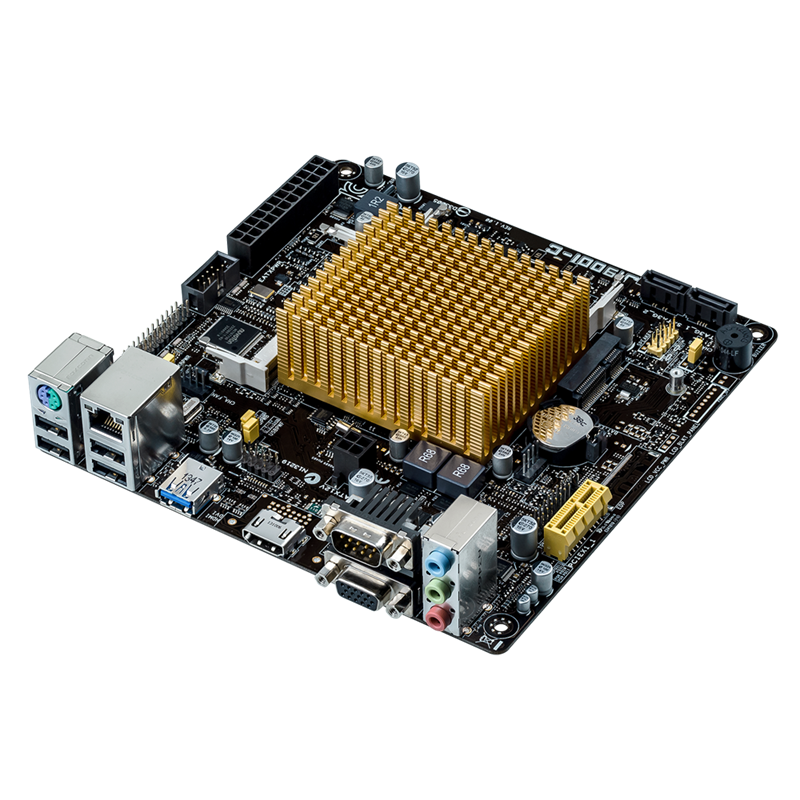
Power efficiency plus high-resolution graphics, thanks to the integrated Intel Celeron® Quad-Core SoC Processor J1900 with HD Graphics support.
This motherboard features an integrated Intel Celeron® Quad-Core Processor J1900 and Intel HD Graphics. This revolutionary 22nm ultra low voltage SoC (System On a Chip) combines superb processing power and advanced HD graphics support in one small, energy efficient design. Despite minimal power requirements, it still has the processing power to display the latest DirectX® 11 HD graphics. It features support for dual independent displays with resolutions up to 2500x1600, and also has integrated USB 3.0 support.
Intel® Smart Connect Technology
Auto application refresh and shorter wait times
Your computer can receive web updates with fresh content for selected applications, even when the system is in sleep mode. This means less time waiting for applications to update and sync with the cloud, leading to a more efficient computing experience.
New UEFI BIOS – friendlier and more intuitive
Exclusive EZ Mode adds useful info to become even easier
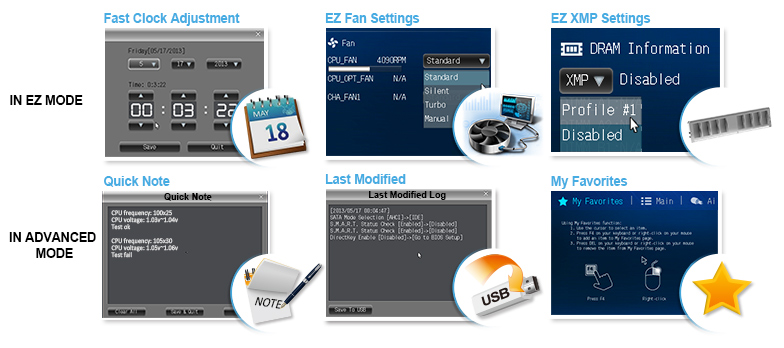
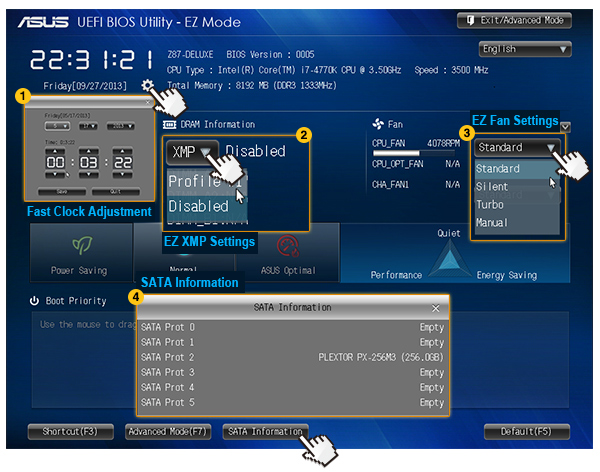
Media-renowned UEFI BIOS from ASUS provides the smoothest mouse-controlled graphical BIOS, and now features more intuitive functions to quickly take you to favorite BIOS pages and frequently-accessed settings through custom shortcuts. You can even write quick notes in-BIOS for future reference, view an activity log of setting changes and modifications, and rename SATA ports. EZ Mode has a whole new look, upgraded with extra-friendly capabilities like detailed fan controls, XMP profile settings, SATA information, and fast clock adjustment. Together, these perfect your BIOS experience.
1. Fast Clock Adjustment
Easily change the time and date in EZ Mode using the mouse.
2. EZ XMP Settings
Quickly apply XMP settings in UEFI BIOS EZ Mode, achieving better DRAM performance.
3. EZ Fan Settings
As demanded by the community, detailed fan controls come to EZ Mode so you can switch fan profiles for quick cooling and noise-level supervision.
4. SATA Information
Displays each SATA port details for you to easily recognize devices.
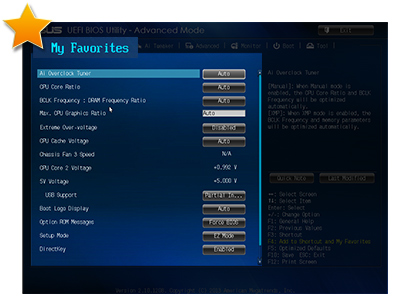
My Favorites
Get all your favorite functions on one page
F4 or right click to add settings to My Favorites under Advanced Mode, which cuts time spent on searching and further speeds up system tuning.
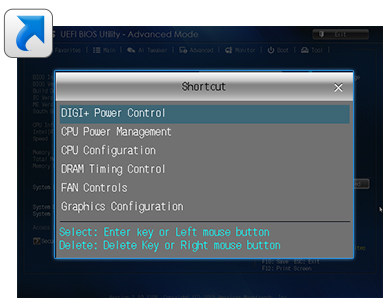
Shortcut
One press to apply and access frequent settings
Now you can customize your own shortcut log by pressing F4 or right clicking to create shortcuts to frequently-used settings. Instantly access them by simply hitting the F3 hotkey.
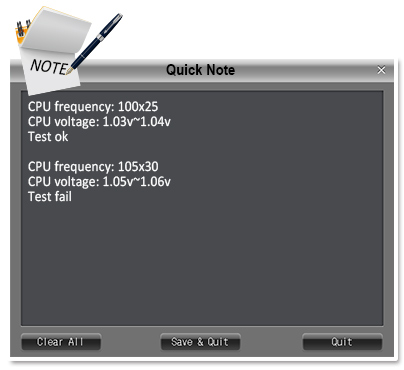
Quick Note
You no longer need to have a pen and paper notepad around. Quick Note works inside the BIOS so you can just type remarks and ideas to help you remember important settings info and save time on trial and error.
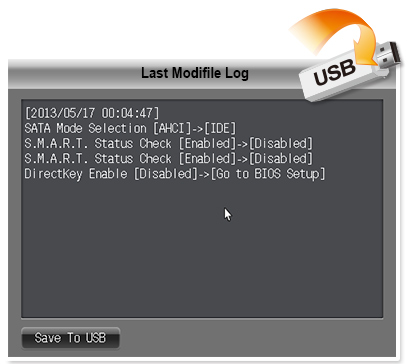
Last Modified
Always forget those important BIOS changes you did? This friendly function creates a tuning log to track your BIOS settings history, which can be saved onto a USB drive.

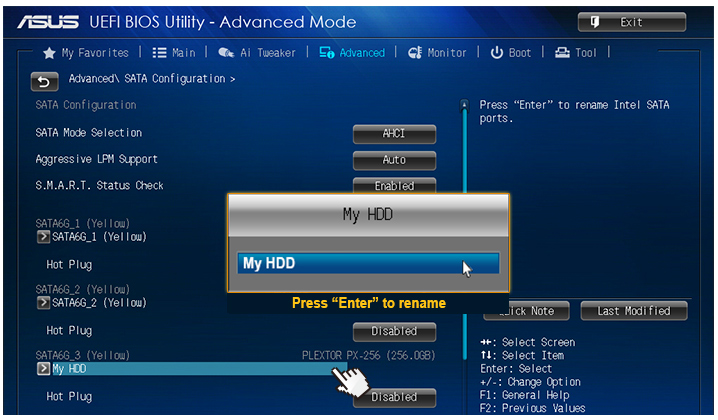
SATA Port Renaming
You can rename your SATA ports for easy identification, including by usage scenario. Get greater convenience and spend less time on finding the right devices when you want to change settings.
Performance Optimization
USB 3.0 Boost (UASP Support)
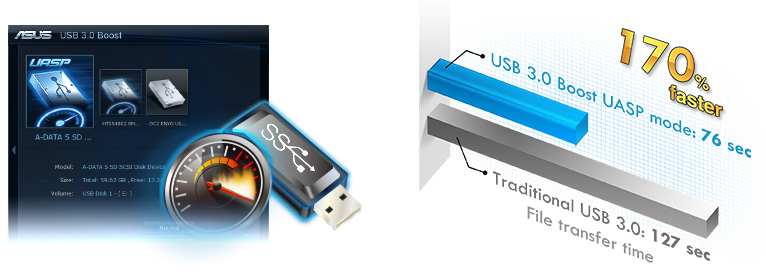
170% faster transfer speeds than traditional USB 3.0
ASUS USB 3.0 Boost technology supports UASP (USB Attached SCSI Protocol) in Windows 8. With USB 3.0 Boost technology, a USB device's transmission speed is significantly increased up to 170%, adding to already fast USB 3.0 performance. ASUS software automatically accelerates data rates for compatible USB 3.0 peripherals without any user interaction.
- World’s 1st USB 3.0 UASP support – instantly 170% faster.
- Complete USB 3.0 solution – performance boost under Turbo Mode or UASP Mode for most USB devices.
- Simple plug and boost – auto detection design ensures best performance.
Network iControl
Real-time network bandwidth management
One click to prioritize network traffic for applications you're currently using or set up favorite profiles to run at specific times. Avoid network congestion, speed up downloading, and make sure online gaming runs optimized, all through an intuitive user interface.
Additional Features
AI Suite 3
One-stop access to innovative ASUS features
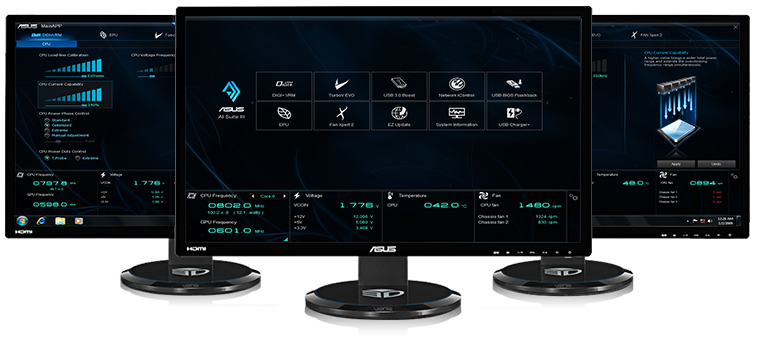
ASUS AI Suite 3 offers a brand new user experience through a clearer and more attractive interface with support for larger monitors. It consolidates all exclusive ASUS features into one simple-to-use package, allowing you to supervise overclocking, energy consumption, fan speeds, voltages and more. This all-in-one app offers diverse and easy to use functionality, with no need to switch back and forth between different utilities.
Fan Xpert
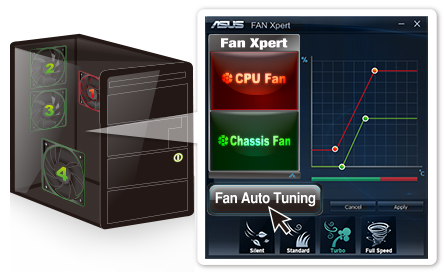
Dedicated CPU and case fan controls
ASUS Fan Xpert intelligently allows you to adjust CPU and case fan speeds according to different ambient temperatures in diverse climate conditions and locations, as well as actual PC loading. Various preset fan performance profiles offer flexible fan speed controls to achieve a quiet and cool environment.
CrashFree BIOS 3
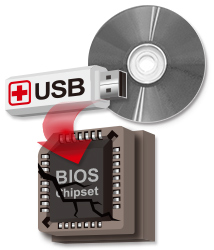
Restore corrupted BIOS data from USB storage
ASUS CrashFree BIOS 3 allows users to restore corrupted BIOS data from a USB flash drive or support CD containing a BIOS file. This utility saves you the cost and hassle of buying a replacement BIOS chip.
Hands-On Video
EZ Flash 2
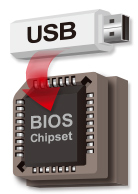
Easy BIOS updates from USB outside the OS
Quickly update your BIOS from a USB flash drive before entering the OS. It only takes a few clicks, with no floppy disk or an OS-based flash utility.
Stainless Steel Back I/O
3X more durable corrosion-resistant coating
ASUS motherboard back I/O panels are made from strong and corrosion-resistant stainless steel, which is bonded with a thin layer of chromium oxide to enhance anti-corrosive properties. Passing 72-hour spray salt endurance tests, ASUS stainless steel back I/O panels have a usage life three times longer compared to ordinary panels.
High-Quality 5K-Hour Solid State Capacitors
2.5X longer lifespan with excellent durability
ASUS high-quality solid state capacitors assure a 5,000-hour lifespan, equivalent to 2.5 times longer than traditional capacitors. All capacitors pass testing under temperatures as high as 105 degrees centigrade and meet Japanese industrial standards to provide excellent durability and enhanced thermal capacity.
Windows 8 Exclusive Features
ASUS Boot Setting
Multiple startup options
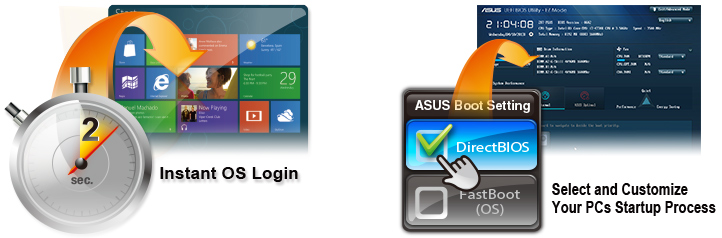
Thanks to ASUS Windows 8 hardware optimization, ASUS Boot Setting provides better flexibility in customizing your PC’s startup process. You can shorten system boot-up time to 2-seconds* for a smoother user experience under Windows 8, and even previous versions of Windows. Also, you can enter the BIOS directly with one click through a user-friendly interface, and quickly select your preferred system boot up method: either get to the OS in seconds or opt for regular boot up. Whatever your choice, settings are saved and persistent, with no need to choose every time you power on.
*On select models
GreenASUS
Motherboards are EU Energy-related Products (ErP) ready, which requires products meet high efficiency standards with regards to energy consumption. This is in line with the ASUS vision of creating environmentally-friendly and energy-efficient products through design and innovation that reduce the carbon footprint of products and thus mitigate ecological impact.

- 本页面数据为理论值,由华硕内部实验室在特定测试环境下测得(详见具体说明)。实际使用效果可能因产品个体、软件版本、使用条件及环境差异略有不同,请以实际情况为准。
- 产品规格可能随地区或产品批次而有所变动,我们建议您在购买时详细咨询销售商。
- 产品图片及颜色可能因拍照光线误差及屏幕设定,可能与实物产品效果有所差异,请以实物为准。
- 本网站所提到的产品信息、规格参数、应用程序、产品图片及产品特性等仅供参考,内容可能随时更新和修订,恕不另行通知。
- PCB板与附赠软件可能随产品批次而略有不同,如有变动,恕不另行通知。
- 本网站所谈论到的产品名称仅做识别之用,而这些名称可能是属于其他公司的注册商标或是版权。
- 词语 HDMI、HDMI High-Definition Multimedia Interface(高清晰度多媒体接口)、HDMI 商业外观和 HDMI 徽标均为 HDMI Licensing Administrator, Inc. 的商标或注册商标。
- 产品规格及功能特性,以及所有图片仅供参考,内容会随时更新,请咨询当地经销商了解详情。
- 产品规格及功能依据具体型号而有所区别。请查阅规格页
- 电器,电子设备,含汞钮电池等...不可与一般垃圾一起丢置,请遵照各地法规处理电子产品。
- 除非另有说明,所有提及的性能数值均为理论值,实际数值可能因实际使用状况等因素而不同。
- 产品规格可能会依国家和地区而有所变动,我们诚挚的建议您与当地的经销商或零售商确认目前销售产品的规格。产品颜色可能会因拍照光线误差或屏幕设定而与实际产品有所差异。我们会尽力提供正确与完整的数据于网页上,并保留更动、修正页面信息的权利,恕不另行通知。
- 该网站上使用和显示的所有商标、标记 (TM,®) 意味着文本、商标、logo 或标语,被视为常见法律保护的商标和/或在美国以及其他国家/地区已经注册的商标。
- 了解更多关于电池使用、拆卸、更换及相关安全指南的信息
**产品规格和电池设计可能因型号而异。如有任何疑问,请联系华硕官方客服。