


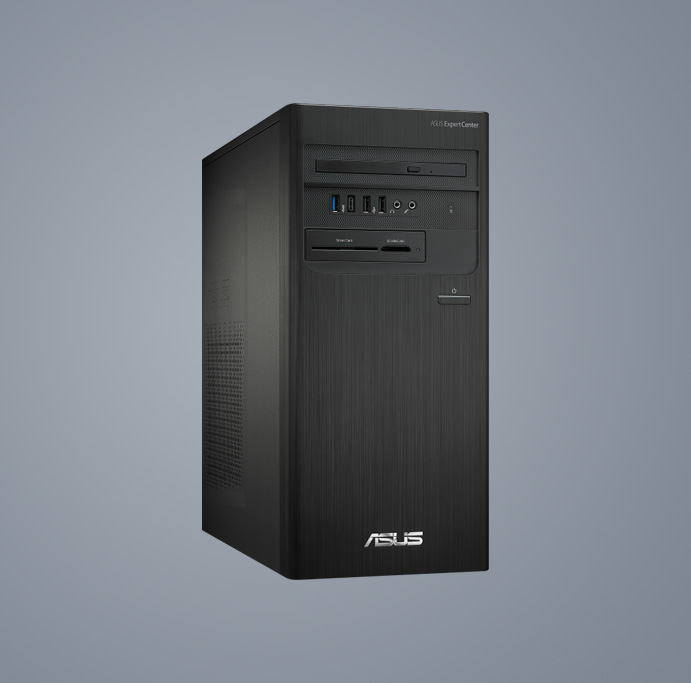
D700TD

27”
- Windows 11 家庭版 - ASUS 推荐使用商用 Windows 11 专业版
- 选配英特尔® 酷睿™ i5 处理器
- 27 英寸 FHD 屏幕
- 选配 16 GB DDR5 内存
- ASUS ExpertGuardian 商业级安全性
- Dolby® Atmos 认证双 5W 扬声器
收起
24”
- Windows 11 家庭版 - ASUS 推荐使用商用 Windows 11 专业版
- 选配英特尔® 酷睿™ i5 处理器
- 23.8英寸 FHD 屏幕
- 选配 64 GB DDR5 内存
- ASUS ExpertGuardian 商业级安全性
- Dolby® Atmos 认证双 5W 扬声器
收起
27”
- Windows 11 家庭版 - ASUS 推荐使用商用 Windows 11 专业版
- 选配英特尔® 酷睿™ i7 处理器
- 27 英寸 FHD 屏幕
- 选配 Intel® graphics
- 选配 32 GB DDR5 内存
- 选配 1 TB SSD
- 93% 屏占比
- AI 智能降噪技术
收起
23.8”
- Windows 11 家庭版 - ASUS 推荐使用商用 Windows 11 专业版
- 选配英特尔® 酷睿™ i7 处理器
- 23.8 英寸 FHD 屏幕
- 选配 32 GB DDR5 内存
- 选配 1 TB SSD
- ASUS ExpertGuardian 商业级安全性
- 93% 屏占比
- AI 智能降噪技术
收起
23.8’’
- Windows 11 家庭版 - ASUS 推荐使用商用 Windows 11 专业版
- 最高支持英特尔® 酷睿™ 7 150U 处理器
- 选配英特尔® graphics
- 选配 DDR5 64GB 5200MHz
- 选配 2TB SSD
- 窄边框, 88% 屏占比
- AI降噪
收起
23.8’’
- Windows 11 家庭版 - ASUS 推荐使用商用 Windows 11 专业版
- 选配英特尔® 酷睿™ 5 120U 处理器
- 选配英特尔® UHD / Iris Xe 核显
- 选配 DDR5 16GB 5600MHz
- 选配 1TB SSD 硬盘
- 窄边框, 86% 屏占比
- AI 降噪
收起
29L
- Windows 11 家庭版 - ASUS 推荐使用商用 Windows 11 专业版
- 选配第11代英特尔® 酷睿™ i9 处理器
- 可选配 NVIDIA® GeForce® RTX 3070 或 NVIDIA® RTX A2000 显卡
- 最高支持 128 GB 内存
- 选配 4 TB HDD + 2 TB SSD 存储空间
- ISV 认证
- Lumiwiz® LED 智能指示灯
收起


- 本页面数据为理论值,由华硕内部实验室在特定测试环境下测得(详见具体说明)。实际使用效果可能因产品个体、软件版本、使用条件及环境差异略有不同,请以实际情况为准。
- 产品规格可能随地区或产品批次而有所变动,我们建议您在购买时详细咨询销售商。
- 产品图片及颜色可能因拍照光线误差及屏幕设定,可能与实物产品效果有所差异,请以实物为准。
- 本网站所提到的产品信息、规格参数、应用程序、产品图片及产品特性等仅供参考,内容可能随时更新和修订,恕不另行通知。
- PCB板与附赠软件可能随产品批次而略有不同,如有变动,恕不另行通知。
- 本网站所谈论到的产品名称仅做识别之用,而这些名称可能是属于其他公司的注册商标或是版权。
- 词语 HDMI、HDMI High-Definition Multimedia Interface(高清晰度多媒体接口)、HDMI 商业外观和 HDMI 徽标均为 HDMI Licensing Administrator, Inc. 的商标或注册商标。
¹Windows 11 升级服务将于 2021 年底至 2022 年面向符合条件的设备提供。不同设备的升级时间存在差异。某些特定功能需要配备专门的硬件才能使用(详见 aka.ms/windows11-spec)。
USB 3.0, 3.1, 3.2 以及 Type-C 的实际传输速度将依据您的使用情境而变化,包括计算机的设备、文件的规格以及系统配置和操作相关的其他因素而影响处理速度。
* 测试方案包括军规级别标准和华硕质量测试的要求,且因设备而异。只针对特定ASUS产品进行 MIL-STD-810 测试。测试的目的不在于证明产品符合DoD合约规定或适用于军事用途。同样,测试结果并不保证未来在这些测试条件下拥有同样的性能。在这些测试条件下造成的意外损坏,不在华硕保修范围内。需要选购 ASUS Premium Care 获得额外的保障。
- 价格可能不包括额外费用,包括税费、运费、手续费、回收费。
- 对于定价信息,华硕仅有权制定建议转售价格。所有经销商均可按照自己的意愿自主定价。

