


- 802.11ac双频无线网络可提供 733 Mbps 的传输速度,打造高性能的无线网络
- 具备两根高增益天线,扩大无线网络覆盖范围
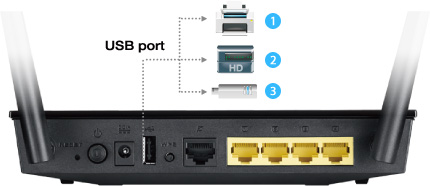
- USB 接口可供打印机连接、存储空间分享及支持 3G/4G 网卡
- ASUS AiCloud 应用程序让您时时存取、同步、分享与串流文件,既快速又方便
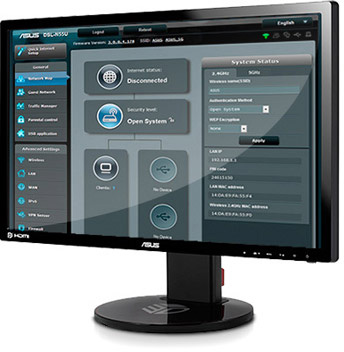
- 简易的 30 秒设定与完备的控制功能,可通过 ASUSWRT 图形化用户界面监控网络
The essential AC upgrade
ASUS RT-AC51U Dual-band Wireless-AC750 router gives you both fast wireless
speed and great value to upgrade your home network to the latest 802.11ac
Wi-Fi technology today. Experience simultaneous dual-band connectivity
and enjoy 300 Mbps speed on the 2.4 GHz frequency and up to 433 Mbps in
5 GHz band.
Thanks to its multipurpose USB port, RT-AC51U is much more than just a
router. Plug in a USB hard disk drive and you’ve got an instant file
server — and one that extends into the cloud via ASUS AiCloud. Alternatively,
attach a USB printer to RT-AC51U to create a print server for sharing one
device with several users. The USB even accommodates 3G/4G mobile broadband
dongles for two broadband (WAN) connections on one router so you’ll
never again have to worry about your internet access going down. The port
can even be used for powering gadgets such as smartphones and tablets,
making it a handy charging station.
The easy-to-use ASUSWRT graphical user interface unlocks the power of
RT-AC51U giving robust control to optimize your network for you. 30-second
setup and easy traffic management means even network newbies can enjoy
its sophisticated features, while power users will love its IPv6 support,
multiple wireless SSIDs and encrypted VPN access.
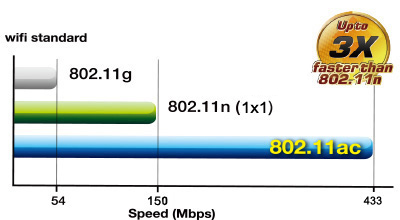
Next gen 802.11ac wireless, up to 3X faster than 1x1 wireless N routers
Powered by 5th generation Wi-Fi (5G Wi-Fi), the 802.11ac chipset gives the RT-AC51U faster wireless speeds than N technology. At 2.4 GHz, it reaches 300 Mbps, while on the 5GHz band it blazes to 433 Mbps. The upgraded bandwidth has the higher capacity you need to increase Wi-Fi enjoyment at home. With notebooks, desktops, pads, and smartphones now all Wi-Fi-reliant, it’s time to upgrade to the next generation to expand you connectivity now and in the future.
Dual-band connectivity for compatibility and performance
Delivering 2.4GHz and 5GHz concurrent bands at up to 300Mbps and 433Mbps, respectively, RT-AC51U has a total combined bandwidth of up to 733Mbps. Perform basic tasks like Web browsing and file downloading on the 2.4GHz band, while simultaneously allowing multiple devices to stream in Full HD or support online gaming and other bandwidth-demanding applications smoothly on the clearer 5GHz band.

No more dead zones with 150% the coverage
Powerful two-way transmission improves Wi-Fi range by 150% compared generic routers, ensuring far-reaching coverage. The unique design of RT-AC51U means a connection you can always rely on.

Add external storage, printers, and other devices to your network
With built-in USB port, connect external storage, printers, and other devices to RT-AC51U and share them throughout your network at once.


Robust control and optimization with ASUSWRT
With the ASUSWRT dashboard UI, setup, monitor, and control network applications
all in one intuitive area. On top of 30-second setup, multi-device detection,
and flexible settings that make the most of your network performance, it’s
been upgraded with quick scanning of USB storage connected to routers to
verify data integrity and drive health. Dual WAN enables having two connections/ISPs
on one router, with load balance and failover mode for added stability
and redundancy to ensure uninterrupted internet access.
Do you game a lot, or spend most of your time streaming videos? Whatever
your planned use is, the RT-AC51U has Quality of Service (QoS) standards
that let you select how much bandwidth is prioritized for virtually any
task. Plus, the traffic monitor allows you to check your Web usage in a
clear graphical interface. Try it.


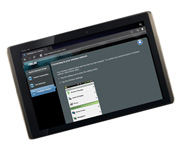
Easy 3-step setup
Use your smartphone, tablet, or PC to effortlessly set up your ASUS router in less than 30 seconds¹ and in only 3 easy steps. Simply connect the cables to the router, open a Web browser, and follow the setup wizard to get you to the internet in no time.
Step1: Open web browser.
Step2: Enter ID/Password.
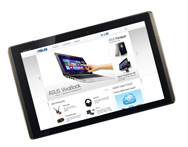
Step3: Done!


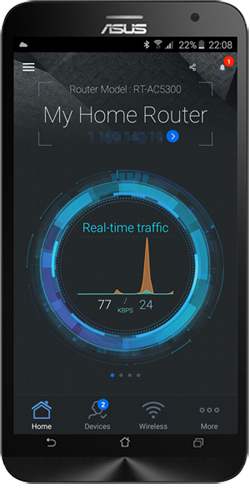
ASUS Router App
Control your network anywhere
In your increasingly mobile-enabled life, having control over your network
via an app is more important than ever. The new ASUS Router App is built
from the ground-up to be both intuitive and robust, allowing you to setup
your router, manage network traffic, diagnose connection issues and even
update firmware, all without needing to boot up a PC.
» Learn more
Click below to download


ASUS AiCloud – Your world on demand
ASUS AiCloud keeps you connected to your data wherever and whenever you have an internet connection. It links your home network and online Web storage service2 and lets you access it through the AiCloud mobile app on your iOS or Android smartphone or through a personalized URL in a Web browser. Learn more.
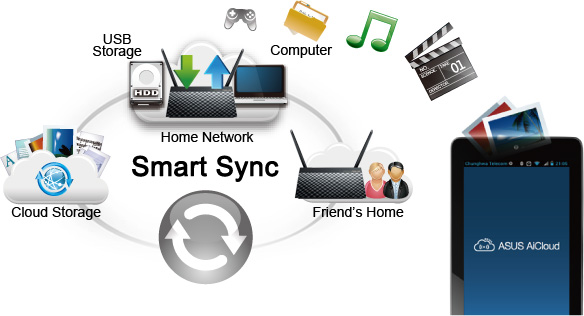

Download and stream anywhere
Download Master and enhanced media server let you download and play multimedia files stored on router-attached USB storage on a wide range of compatible devices such as PC, pad, PS4, Xbox, and smart TV. Download Master can also download files while your PC is turned off, and allows you to manage and monitor download status remotely.


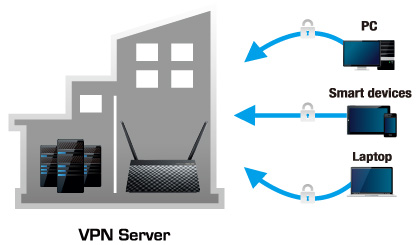
VPN server enabled
Easily set up a VPN server to browse the web and access data with PPTP encryption— no matter where you are.

Keep Up to Date!
Remember to always keep your device’s firmware up to date so you can benefit from the very latest service and security enhancements — and get exciting new features! Learn more about updating new firmware.
*2 Works with select Web storage services only.
* ASUS received the highest numerical score among wireless routers in the J.D. Power 2015 Wireless Router Satisfaction Report, based on 2,716 responses from 8 companies measuring satisfaction with wireless routers surveyed November-December 2015. Your experiences may vary. Visit jdpower.com


- 本页面数据为理论值,由华硕内部实验室在特定测试环境下测得(详见具体说明)。实际使用效果可能因产品个体、软件版本、使用条件及环境差异略有不同,请以实际情况为准。
- 产品规格可能随地区或产品批次而有所变动,我们建议您在购买时详细咨询销售商。
- 产品图片及颜色可能因拍照光线误差及屏幕设定,可能与实物产品效果有所差异,请以实物为准。
- 本网站所提到的产品信息、规格参数、应用程序、产品图片及产品特性等仅供参考,内容可能随时更新和修订,恕不另行通知。
- PCB板与附赠软件可能随产品批次而略有不同,如有变动,恕不另行通知。
- 本网站所谈论到的产品名称仅做识别之用,而这些名称可能是属于其他公司的注册商标或是版权。
- 词语 HDMI、HDMI High-Definition Multimedia Interface(高清晰度多媒体接口)、HDMI 商业外观和 HDMI 徽标均为 HDMI Licensing Administrator, Inc. 的商标或注册商标。
- USB 3.0, 3.1, 3.2 以及 Type-C 的实际传输速度将依据您的使用情境而变化,包括计算机的设备、文件的规格以及系统配置和操作相关的其他因素而影响处理速度。
- 实际数据传输速度和 Wi-Fi 覆盖范围会因网络条件和环境因素而有所不同,包括网络流量、建筑物材料和结构,以及网络额外负荷,造成实际数据传输速度较低或无线覆盖范围较小。
- 在此引用的网络速度与带宽,系依据现行 IEEE 802.11ac 规格。 实际性能可能会受网络与服务供货商因素、接口类型及其他条件影响。连接的设备必须兼容于 802.11ac,才可提供更佳连接质量。
- WPA/WPA2企业级安全仅适用于单路由器模式,不支持AiMesh模式。
- 启用传统QoS时,受实际互联网带宽及环境差异限制,可能存在速度降低风险。
- 由于USB外置硬盘与4G/5G调制解调器设备对电源供应的要求不同,为确保外接设备能稳定使用,若USB外接设备超过标准USB 2.0(5V/500mA)及USB 3.1 Gen 1(5V/900mA)的供电要求,需配合独立外接电源使用。
- 若您将本产品与第三方服务结合使用,您需自行负责遵守该第三方供应商的条款与条件及隐私政策,并承担由此产生的风险。华硕不对非华硕产品提供支持,亦不保证持续的集成支持。
- 对于支持Time machine功能的机型,从 macOS 26(Tahoe)开始,Time machine将不再支持在 USB 连接的存储设备上创建新备份。先前已配置的现有Time machine驱动器仍保持兼容,可继续用于备份和恢复操作。

