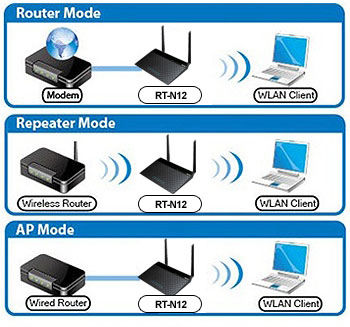
具备路由器/AP 中继器/无线网络延伸器的三合一无线路由器
  • 具备路由器/AP中继器/无线网络延伸器三合一无线路由器的多种无线模式
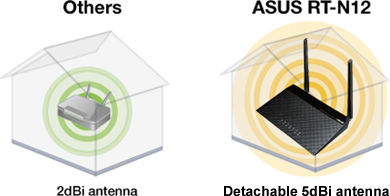
  • 配置2 条可拆式 5dbi 高增益天线,以增强信号及扩大无线信号覆盖范围
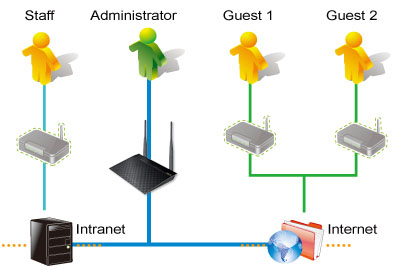
  • 4组 SSID 有助于带宽分配和访问控制的管理
  • 强大的在线多任务处理,支持高达 30,000 个数据连接数
RT-N12 D1

Consistently Praised for Networking Excellence!

Readers’ Choice, 6 Years Running! (2012-2017)
“No brand is more likely to be recommended than ASUS. The company receives excellent marks for their ease of setup and reliability.”– PC Magazine >>Learn more.

Recommended Excellence Award for Best Router Brand, PC Pro Technology Excellence Awards 2016.

The Most Consumer Recommended Router Maker of 2015!– PC Magazine
>>Learn more.

3-in-1 Router/AP/Range Extender for Large Environment

The RT-N12 is a 300Mbps Wireless N Router with both wired and wireless network connections designed specifically for small business and home office networking use. With 2T2R MIMO Technology and two detachable 5dBi high gain antennas, the RT-N12 creates a an extended coverage area with advanced wireless performance, making it ideal for streaming HD video, placing VoIP calls and online gaming. With the ASUS unique Quick Internet Setup and Graphical User Interface, the RT-N12 is easy for anyone to install and manage, even for novices! The RT-N12 even allows you to set up 4 SSIDs, so, users can flexibly manage internet access and bandwidth allocation.

Extremely Long Operating Range with High Power Technology

This unique and efficient design drastically increases wireless signal coverage and quality with a built-in singal amplifier. Advanced High Power technology from ASUS enhances signal strength and can almost double the range.

Multiple SSID for Flexible Wireless Access Control

Share your internet connection with your guests with no need to share your personal password or network resources. ASUS Guest Network supports up to three separate guest networks, each with its own usage limits and password. Guests cannot access your primary network or any other connected devices.

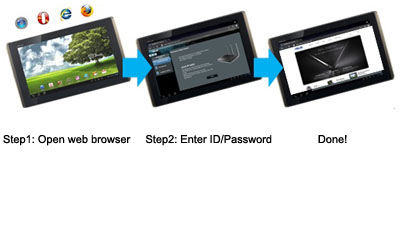
3-Step Easy Setup Through Your Pad, Smartphone, or PC

With the RT-N12, setup is a breeze. Simply power and connect the router and open a browser on a Wi-Fi-enabled device like a notebook or pad. You will then be taken to a setup page with a prompt to enter the ID/password from your internet provider, and that’s it! Setting up your network is easier than ever.

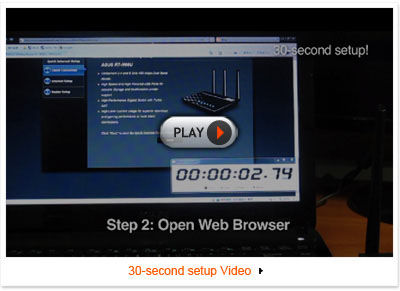
Get Online in 30 Seconds

Smart auto-detection design makes it possible for you to go from first plugging in the RT-N12 to setup completion in 30 seconds! Compared to the lengthy installs and hassles of other routers, this development from ASUS offers a true wonder of ease of use, and puts fast networking speeds within your reach quicker than ever before.

30 second setup

EZ Switch

Software EZ switch provides a quick and easy way to change between router, repeater and AP modes. Instantly select router, range extender, and access point modes with extra-quick settings in the user-friendly interface. No delays and no hassles – whatever your situation, take your pick and get connected.

Keep Up to Date!

Remember to always keep your device’s firmware up to date so you can benefit from the very latest service and security enhancements — and get exciting new features! Learn more about updating new firmware.

* ASUS received the highest numerical score among wireless routers in the J.D. Power 2015 Wireless Router Satisfaction Report, based on 2,716 responses from 8 companies measuring satisfaction with wireless routers surveyed November-December 2015. Your experiences may vary. Visit jdpower.com

相关产品
previous image
next image
  • 本页面数据为理论值,由华硕内部实验室在特定测试环境下测得(详见具体说明)。实际使用效果可能因产品个体、软件版本、使用条件及环境差异略有不同,请以实际情况为准。
  • 产品规格可能随地区或产品批次而有所变动,我们建议您在购买时详细咨询销售商。
  • 产品图片及颜色可能因拍照光线误差及屏幕设定,可能与实物产品效果有所差异,请以实物为准。
  • 本网站所提到的产品信息、规格参数、应用程序、产品图片及产品特性等仅供参考,内容可能随时更新和修订,恕不另行通知。
  • PCB板与附赠软件可能随产品批次而略有不同,如有变动,恕不另行通知。
  • 本网站所谈论到的产品名称仅做识别之用,而这些名称可能是属于其他公司的注册商标或是版权。
  • 词语 HDMI、HDMI High-Definition Multimedia Interface(高清晰度多媒体接口)、HDMI 商业外观和 HDMI 徽标均为 HDMI Licensing Administrator, Inc. 的商标或注册商标。
  • USB 3.0, 3.1, 3.2 以及 Type-C 的实际传输速度将依据您的使用情境而变化,包括计算机的设备、文件的规格以及系统配置和操作相关的其他因素而影响处理速度。
  • 实际数据传输速度和 Wi-Fi 覆盖范围会因网络条件和环境因素而有所不同,包括网络流量、建筑物材料和结构,以及网络额外负荷,造成实际数据传输速度较低或无线覆盖范围较小。
  • 在此引用的网络速度与带宽,系依据现行 IEEE 802.11ac 规格。 实际性能可能会受网络与服务供货商因素、接口类型及其他条件影响。连接的设备必须兼容于 802.11ac,才可提供更佳连接质量。
  • WPA/WPA2企业级安全仅适用于单路由器模式,不支持AiMesh模式。
  • 启用传统QoS时,受实际互联网带宽及环境差异限制,可能存在速度降低风险。
  • 由于USB外置硬盘与4G/5G调制解调器设备对电源供应的要求不同,为确保外接设备能稳定使用,若USB外接设备超过标准USB 2.0(5V/500mA)及USB 3.1 Gen 1(5V/900mA)的供电要求,需配合独立外接电源使用。
  • 若您将本产品与第三方服务结合使用,您需自行负责遵守该第三方供应商的条款与条件及隐私政策,并承担由此产生的风险。华硕不对非华硕产品提供支持,亦不保证持续的集成支持。
  • 对于支持Time machine功能的机型,从 macOS 26(Tahoe)开始,Time machine将不再支持在 USB 连接的存储设备上创建新备份。先前已配置的现有Time machine驱动器仍保持兼容,可继续用于备份和恢复操作。